Tracking data
Tracking data present visitor/anonymous profile (without identified attributes captured) and contact/identified profile (with identified attributes captured).
Normally, tracking data has been tracked by our SDK via website, mobile app or by API via integrated connection like Zalo.
View tracking list
You should have right permission to view visitor data. Contact your administrator to assign permission.
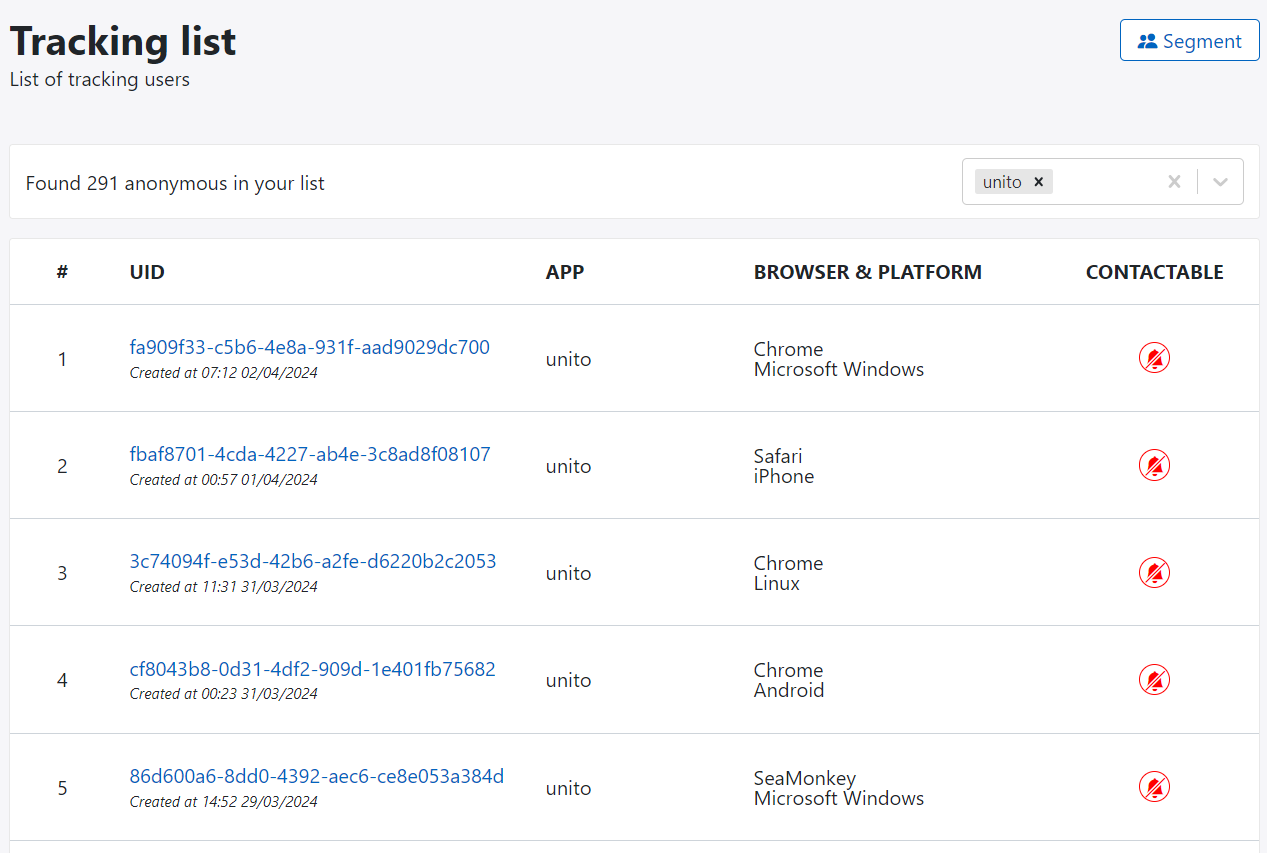
In plaform, there is no way to create new tracking data manually. You only can view tracking data by following below step:
- Go to Single Customer View menu
- Click on Tracking list button at top header
- The platorm will displayed list of tracking data page by page
- Select app to filter tracking data by
View tracking detail

Basic information
Depending on anonymous profile or identified profile, the basic information section will display difference data
- Anonynous profile: Browser or device usage, Operating system and platform, created date and last visiting.
- Identified profile: Basic demographic data like first name, last name, email address, mobile number
Linked profiles
Display all profiles that have same value with current profile via identified attributes.
Segmentations
Display list of segementation that profile belong to. You can click on segmentation item to go to segmentation detail page.
Campaigns
Display all campaigns that sent to this profile
Journey
Display all journeys that sent to this profile
Activity timeline
Display latest activities that associated with this profile. You can click/roll to load historical activity or filter activity by app